It seems like Ubuntu dropped Gnome shell and replaced it with Unity. Oneiric Ocelot will be shipped with Unity as default. But they say it will be much more improved.
Also heard a rumor that Fedora 16 will be shipped with unity.
Oneiric Ocelot will be powered using Linux Kernel 3.0 final
Other changes are improved application switcher, smoother compiz grid plugin and software center also got some improvements.
Screen Shots
Showing posts with label shell themes. Show all posts
Thursday, August 18, 2011
Sunday, July 03, 2011
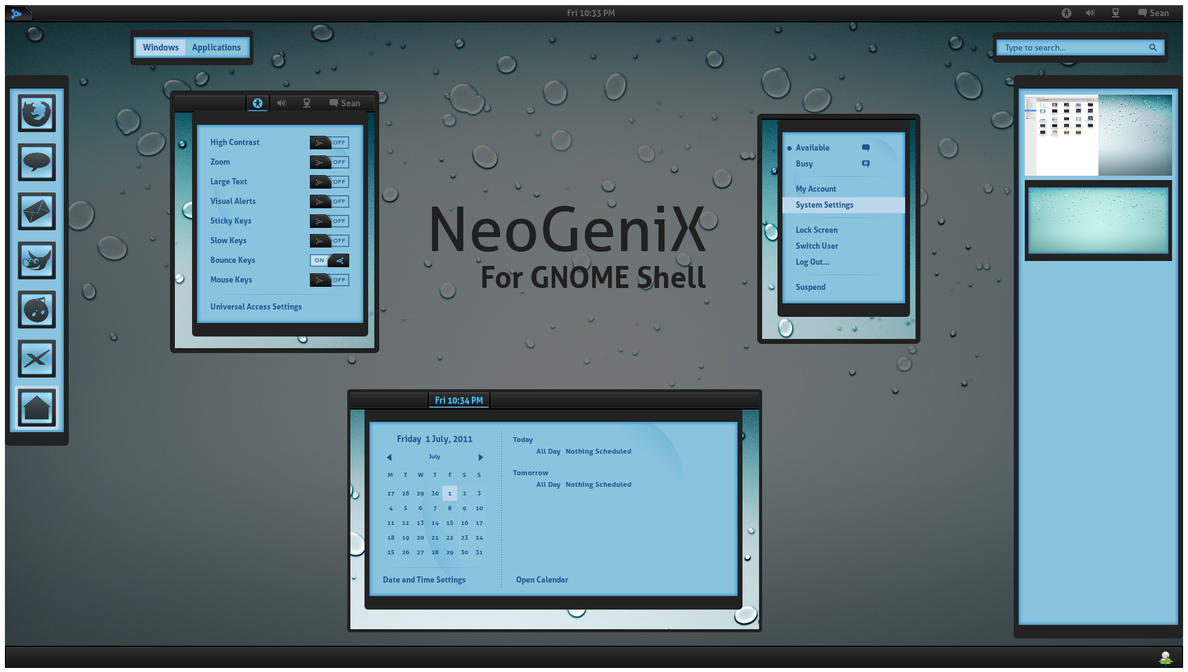
NeoGeniX by *half-left | GNOME Shell Theme
Download This is a GNOME Shell theme based on the NeoGeniX XP theme by dobee. NeoGeniX by dobee (thanks for the permission to port this theme). iDrops wallpaper by nyolc8 NeoGeniX Icons Suite by kali2005 Instructions: Backup your theme directory first. Extract the zip file and rename "gnome-shell" directory to "theme" and copy to /usr/share/gnome-shell/. This path is usually where GNOME Shell is installed. Restart GNOME Shell by Alt, F2, then type r and press enter. You can use the gnome-shell theme extension for easier installation of themes. Notes: This theme is compatible with GNOME Shell 3.0. This theme supports the gnome-tweak-tool/extension for easy theme switching. Just download the zip, load up the GNOME Tweak Tool, go to Shell> find the zipped theme from the box and select it. License: GPL |
Saturday, July 02, 2011
Wednesday, June 29, 2011
Animated mayur | Gnome 3 Shell Theme
Animated mayur.tar.gz
Description:
A variant of my own work Mayur
License: GPL
Download
Animated mayur.tar.gz
Description:
A variant of my own work Mayur
Animated search results
app-well dock also have animation
Improvement will be based on the comments.
Go to the terminal write \"sudo nautilus \"
Unzip the downloaded file, and everything in the theme folder to copy \"/usr/share/gnome-shell/theme\"
Press the \\\"ALT\\\" key and \\\"F2\\\" to write the dialogue, the letter \"r\" and press Enter ....
License: GPL
Download
Animated mayur.tar.gz
Tuesday, June 28, 2011
Best GTK 3 Themes Ever | Ubuntu n Fedora Themes
Download all in a single pack
Click on the Image caption to Download each
These are some of gtk3 themes I reviewed
To apply these themes Refer here
Click on the Image caption to Download each
These are some of gtk3 themes I reviewed
To apply these themes Refer here
![]() |
| Drakfire Caffe GTK3 |
![]() |
| Hope gtk3 |
![]() |
Elegant Brit gtk3 |
![]() |
| Aldabra |
![]() |
| Atolm-gtk3 |
Labels:
10,
11.04,
11.10,
15,
9.04,
Fedora,
fedora 15,
FSCK,
Gnome 3,
Gnome3,
Gtk 3,
How to install Burg boot loader in Ubuntu 11.04 Natty Narwhal,
Linux,
natty,
shell themes,
themes,
ubuntu
Wednesday, June 22, 2011
Gnome 3 Theme | Mayur
Try this simple theme created by me.
Download
To apply
Go to the terminal write "sudo nautilus "
Unzip the downloaded file, and everything in the theme folder to copy "/usr/share/gnome-shell/theme"
Press the "ALT" key and "F2" to write the dialogue, the letter "r" and press Enter ....
Saturday, June 18, 2011
Gnome 3 Theme| Vignesh Shell Theme
Download
How to apply
Go to the terminal write "sudo nautilus "
Unzip the downloaded file, and everything in the theme folder to copy "/usr/share/gnome-shell/theme"
Better take a backup of that folder.
Press the "ALT" key and "F2" then hit letter "r" and press Enter ....
Monday, June 06, 2011
Gnome3 Customization | Change Icon Size
To change the size of the icons in the activity Tab, you need to customize the file /usr/share/gnome-shell/theme/gnome-shell.css.
open the file in gedit or any text editor you like
sudo gedit /usr/share/gnome-shell/theme/gnome-shell.cssthe following section describes the icon size and table structure.
spacing: 36px;
-shell-grid-item-size: 118px;
}
.icon-grid .overview-icon {
icon-size: 96px;
}
so to reduce the size of the table , you need to change the entries spacing and -shell-grid-item-size
to reduce the size change the values as follows
.icon-grid {
spacing: 25px;
-shell-grid-item-size: 50px;
}
.icon-grid .overview-icon {
icon-size: 50px;
}
Choose values according to your displaY resolution.
--
Happy Hacking
Tuesday, May 31, 2011
Gnome3 Themes | Hope
Try this Hope theme by grvrulz
How to
Download
Extract the contents to
/usr/share/themes/Open
gnome-tweak-toolChange Current Theme to Hope in Window Tab
Change Gtk+ Theme to Hope in Interface Tab
To install gnome-tweak-tool in Fedora !5
sudo yum install gnome-tweak-tool--
Happy hacking
Friday, May 06, 2011
Gnome 3 Themes | How to install Gnome 3 Gtk 3 and shell themes?
How to install Gnome 3 Gtk 3 and shell themes?
![]() |
| Download Atolm Theme |
Click here to download some Best Shell themes
Try my vignesh shell theme
Click here for GTK 3 themes
To install the theme, extract it and copy the Atolm-gtk3 folder to /usr/share/themes/
then use GNOME Tweak Tool to change the GTK theme.
To install Atolm Mutter theme (for GNOME Shell)
- press ALT + F2, enter "gconf-editor"
- or
sudo gconf-editor - navigate to desktop > gnome > shell > windows
- change the "theme" value to "Atolm-gtk3".
- Please note that it's no longer required to copy the theme to ~/.themes/ too for the Mutter theme to work (tested on Fedora 15 and ubuntu natty 11.04 with all the packages up to date).
- After changing the Mutter theme, remember to reload Gnome Shell (ALT + F2 and enter "r") or log out.
Subscribe to:
Posts (Atom)