Friday, October 10, 2014

Javascript : Sorting with locale (German Language Sorting)

Javascript's .sort() will work only on English.

So sorting languages like German, French having some special characters in addition to english alphabets is not possible with .sort of javascript.

For array
 var arr = ["Übelkeit", "Veränderte Geschmacksempfindung", "Veränderte Geschmacksempfindung", "Ödem (Schwellung)", "Nasenbluten"] 

normal sorting using

arr.sort(function(a, b) 
{
     if (typeof a === 'string' && typeof b === 'string')
         return (a > b) ? 1 : ((a < b) ? -1 : 0); }); 
}

will sort like this.

["Nasenbluten", "Veränderte Geschmacksempfindung", "Veränderte Geschmacksempfindung", "Ödem (Schwellung)", "Übelkeit"] 

But in german Ü = U and the order is Ü < ü < U < u .
also for similar letters.

A small mode to the actual sorting will solve this.
using localeCompare

arr.sort(function(a, b) 
{
    if (typeof a === 'string' && typeof b === 'string')
        return a.toLowerCase().localeCompare(b.toLowerCase()); 
});

["Nasenbluten", "Ödem (Schwellung)", "Übelkeit", "Veränderte Geschmacksempfindung", "Veränderte Geschmacksempfindung"]

Happy :) ?

Saturday, September 28, 2013

Open Shift Django Basic

My 1 week research on various Paas ended at open shift.
I was a fan of heroku. Some pros of  openshift are 3 gears instead of 1 single dyno
and each gear have a 512MB memory, 1GB local storage than read only file system.
So a total of 1.5GB Ram and 3GB storage :)

Now coming to django to openshift

install rhc using

sudo gem install rhc

create an open shift app using

rhc app create APPNAME python-2.7 -s

-s is for auto scaling

edit setup.py

nano APPNAME/setup.py

uncomment the line install_requires=['Django==xxxxxxx
and change it according to the required django version if its 1.5.1

install_requires=['Django==1.5.1']

save and exit

git commit -am 'Initial commit'
git push


django app should be put in side wsgi

cd wsgi
django-admin.py startproject PROJECTNAME


edit the file application

nano application

delete the contents and paste the new contents

#!/usr/bin/python
import os, sys

os.environ['DJANGO_SETTINGS_MODULE'] = 'PROJECTNAME.settings'
sys.path.append(os.path.join(os.environ['OPENSHIFT_REPO_DIR'], 'wsgi',
    'PROJECTNAME'))

virtenv = os.environ['APPDIR'] + '/virtenv/'
os.environ['PYTHON_EGG_CACHE'] = os.path.join(virtenv, 'lib/python2.6/site-packages')
virtualenv = os.path.join(virtenv, 'bin/activate_this.py')

try:
    execfile(virtualenv, dict(__file__=virtualenv))
except IOError:
    pass

#
# IMPORTANT: Put any additional includes below this line.  If placed above this
# line, it's possible required libraries won't be in your searchable path
#
from django.core.handlers import wsgi
application = wsgi.WSGIHandler() 


Now push the changes

cd ..
git add .
git commit -a -m "Project Creation"
git push 


Wait for push to finish,

One drawback of openshift is the time take to restart an app after a change is pushed.

Sunday, September 01, 2013

Django FastCgi with Nginx

When Launching a  django app, Configuring an nginx virtual host is the most tedious thing. I never can write a configuration with out fiddling with it for a day.

So I descided to write a script for it to auto manage it,

Clone my git hub repo https://github.com/abhisheklalnediya/djangonginx

copy the StartServer.sh to the app directory
specify the port for nginx as the first argument
eg :
$ StartServer.sh 8011

What it does is:
1. Start django in fasctcgi
2. Generate an nginx virtual host configuration file
3. Reloads nginx
4. Happy :) ?
Saturday, May 12, 2012

Bug:Freezing gnome-shell after some work hours

A bug on Gnome shell,
when Gnome shell is used for some time, about an hour or more, i t hangs,
the mouse does not hangs.

So its the problem with gnome-shell.

Bug reported on redhat bugzill is availiable at bugzilla.redhat.com.

So for those guys this is really an annoying thing, there is a temporary solution  .


Go to tty1 by pressing

Ctrl + Alt + F1

Now login using user name and password, (Number pad doesn't work here)

On successful login

pkill gnome-shell

Now go back to GUi by

Ctrl + Alt + F7

Friday, September 16, 2011

[Solved] Fedora 15, 14 : Can't login using tty 1~6

From Fedora 14 , its not allowed to login  using tty.
Neither root nor other users can login using tty.
This problem is caused by a file in /etc/udev/rules.d/
So i deleted all the files in that folder.


Dont worry, it wont do any harm, I tested it in my F15
reboot the system

Now you can login using tty.
Some of the deleted files are automatically created after the reboot

Thursday, August 18, 2011

Ubuntu 11.10

It seems like Ubuntu dropped Gnome shell and replaced it with Unity. Oneiric Ocelot will be shipped with Unity as default. But they say it will be much more improved.
Also heard a rumor that Fedora 16 will be shipped with unity.
Oneiric Ocelot will be powered using Linux Kernel 3.0 final
Other changes are improved application switcher, smoother compiz grid plugin and software center also got some improvements.
Screen Shots

Saturday, August 06, 2011

Fedora 16 : Switching from ext3 to Btrfs

There is news that the upcoming Fedora 16 will be shipped with a brand new unstable file system called Btrfs as DEFAULT. The Btrfs is not yet stable according to wikipedia.
But surely it will be a star to the crown of F16 like Gnome 3 of F15. The new FS is rich in features.
No need to worry about the current data in ext3 or ext4 filesystem. They can be easily mounted as Btrfs with write support.
The Btrfs is revolutionary because most of the disk management operations can be done online ie you dont need to unmount a partition to perform a resize or creation of new partition.


Wikipedia

Tuesday, July 05, 2011

UM Player : A Must Try Media Player


Umplayer is for those ho is not comfort with the default Mplayer or VLC.
The skins of um player is the best and it keeps it to a level higher
Another important feature are:

Can download subtitles form opensubtitles.org
Can search on youtube and download the video

Any way this is a media player a Linux User should try.


Downloads
Source
Fedora 14,15 (64bit)
Fedora 14,15 (32bit)
For Ubuntu, its available in its repository.

Sunday, July 03, 2011

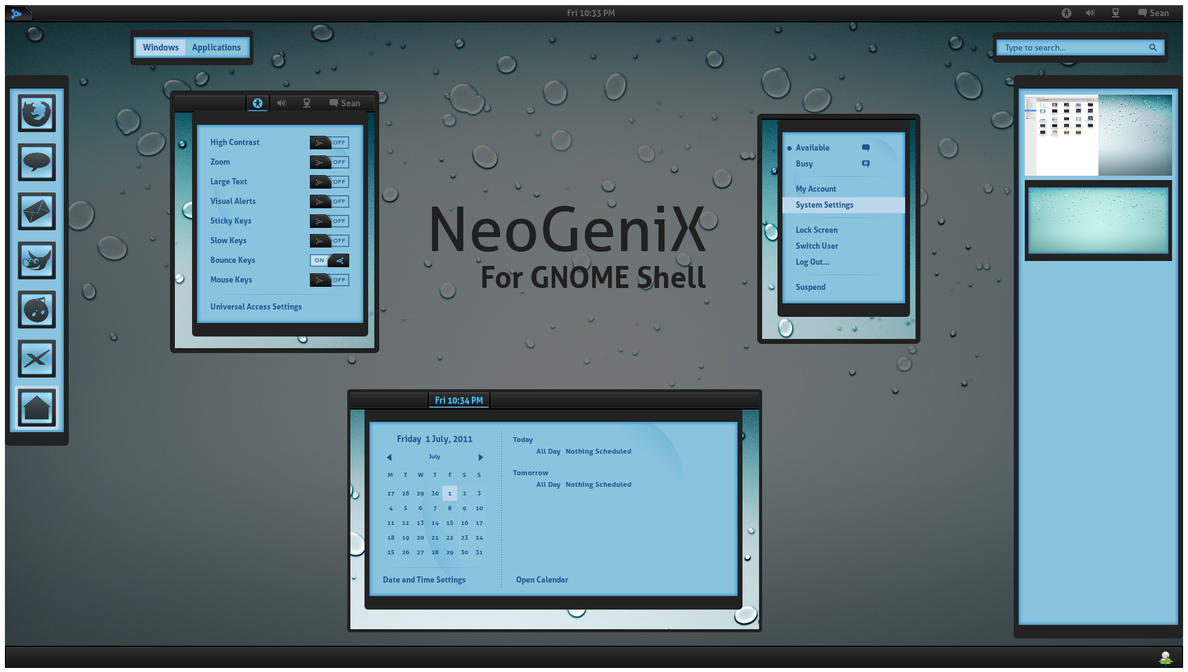
NeoGeniX by *half-left | GNOME Shell Theme


Download

This is a GNOME Shell theme based on the NeoGeniX XP theme by dobee.

NeoGeniX by dobee (thanks for the permission to port this theme).

iDrops wallpaper by nyolc8

NeoGeniX Icons Suite by kali2005


Instructions:

Backup your theme directory first. Extract the zip file and rename "gnome-shell" directory to "theme" and copy to /usr/share/gnome-shell/. This path is usually where GNOME Shell is installed.
Restart GNOME Shell by Alt, F2, then type r and press enter.

You can use the gnome-shell theme extension for easier installation of themes.

Notes:

This theme is compatible with GNOME Shell 3.0.

This theme supports the gnome-tweak-tool/extension for easy theme switching. Just download the zip, load up the GNOME Tweak Tool, go to Shell> find the zipped theme from the box and select it.

License: GPL

Wednesday, June 29, 2011

Animated mayur | Gnome 3 Shell Theme

Animated mayur.tar.gz


Description:

A variant of my own work Mayur

Animated search results
app-well dock also have animation


Improvement will be based on the comments.

Go to the terminal write \"sudo nautilus \"

Unzip the downloaded file, and everything in the theme folder to copy \"/usr/share/gnome-shell/theme\"

Press the \\\"ALT\\\" key and \\\"F2\\\" to write the dialogue, the letter \"r\" and press Enter ....


License: GPL
Download
Animated mayur.tar.gz

Wednesday, June 22, 2011

Gnome 3 Theme | Mayur


Try this simple theme created by me.


Download

To apply


Go to the terminal write "sudo nautilus "

Unzip the downloaded file, and everything in the theme folder to copy "/usr/share/gnome-shell/theme"

Press the "ALT" key and "F2" to write the dialogue, the letter "r" and press Enter ....

Saturday, June 18, 2011

Gnome 3 Theme| Vignesh Shell Theme


Download


How to apply


Go to the terminal write "sudo nautilus "

Unzip the downloaded file, and everything in the theme folder to copy "/usr/share/gnome-shell/theme"

Better take a backup of that folder.

Press the "ALT" key and "F2" then hit letter "r" and press Enter ....

Sunday, June 12, 2011

Gnome3 Customization | Change Panel Colour n Transparency


The default opaque panel on top of gnome3 is like eating milk n chala curry.
The /usr/share/gnome-shell/theme/panel-border.svg is the main file to be changed to change its appearance.

Now wake the gimp expert in you

open the file /usr/share/gnome-shell/theme/panel-border.svg in gimp

must be root to do it


sudo gimp /usr/share/gnome-shell/theme/panel-border.svg


modify the file as you wish


here i deleted the whole image

ctrl + a
Del


then took the brush tool choose colour black (default)

set Opacity to 52

made the brush image large enough to cover the full image

painted once in the image

then choose orange colour,

set Opacity to 100


painted a line in the bottom, this will appear as the bottom border.

saved it as

panel-border.png

because in gimp does not support saving a file in .svg format.
Also i don't know whether svg can handle alpha channel.

now the pic will look like as shown


Now open up the file /usr/share/gnome-shell/theme/gnome-shell.css


/usr/share/gnome-shell/theme/gnome-shell.css


goto the section

#panel {
    color: #ffffff;
    background-color: black;
    border-image: url("panel-border.png") 1;
    font-size: 8.5pt;
    height: 1.86em;
}


change the line border-image: url("panel-border.svg") 1;

to

border-image: url("panel-border.png") 1;


save the file

reload the gnome3 desktop by hitting

Alt+F2

then enter

r

hit Enter


--
Happy Hacking

Wednesday, June 08, 2011

Gnome3 Customization | Change Alt+Tab color


To change the color or transparency of Alt+tab App switcher in Gnome 3, you need to edit the file "/usr/share/gnome-shell/theme/gnome-sll.css"
You can do much if you know css basics.


Open the file

sudo gedit /usr/share/gnome-shell/theme/gnome-sll.css


go to the section

.switcher-list

use search to find it (ctrl + f)

the line

background: rgba(R,G,B,A);


The R,G,B for rgb values of the colour
Change it by referring here

A stands for alpha channel. use a value from  0.0 to 1.0
0 is transparent.

example :

.switcher-list {
    background: rgba(173,255,47,0.5);
    border: 1px solid brown;
    border-radius: 24px;
    padding: 20px;

    font-size: 9pt;
    color: brown;
}

In the example above i have changed the border colour to brown.

--
Happy hacking

Monday, June 06, 2011

Gnome3 Customization | Change Icon Size


To change the size of the icons in the activity Tab, you need to customize the file /usr/share/gnome-shell/theme/gnome-shell.css.

open the file in gedit or any text editor you like

sudo gedit /usr/share/gnome-shell/theme/gnome-shell.css


the following section describes the icon size and table structure.

.icon-grid {
    spacing: 36px;
    -shell-grid-item-size: 118px;
}

.icon-grid .overview-icon {
    icon-size: 96px;
}

so to reduce the size of the table , you need to change the entries spacing and -shell-grid-item-size

to reduce the size change the values as follows


.icon-grid {
    spacing: 25px;
    -shell-grid-item-size: 50px;
}

.icon-grid .overview-icon {
    icon-size: 50px;
}


Choose values according to your displaY resolution.


--
Happy Hacking

Thursday, June 02, 2011

man FSCK

NAME
       fsck - check and repair a Linux file system

SYNOPSIS

       fsck [-lsAVRTMNP] [-C [fd]] [-t fstype] [filesys...]  [--] [fs-specific-options]

DESCRIPTION
       fsck  is  used to check and optionally repair one or more Linux file systems.  filesys can be a device name (e.g.  /dev/hdc1, /dev/sdb2), a
       mount point (e.g.  /, /usr, /home), or an ext2 label or UUID specifier  (e.g.   UUID=8868abf6-88c5-4a83-98b8-bfc24057f7bd  or  LABEL=root).
       Normally,  the fsck program will try to handle filesystems on different physical disk drives in parallel to reduce the total amount of time
       needed to check all of the filesystems.

       If no filesystems are specified on the command line, and the -A option is not specified, fsck  will  default  to  checking  filesystems  in
       /etc/fstab serially.  This is equivalent to the -As options.

       The exit code returned by fsck is the sum of the following conditions:
            0    - No errors
            1    - File system errors corrected
            2    - System should be rebooted
            4    - File system errors left uncorrected
            8    - Operational error
            16   - Usage or syntax error
            32   - Fsck canceled by user request
            128  - Shared library error
       The exit code returned when multiple file systems are checked is the bit-wise OR of the exit codes for each file system that is checked.

       In  actuality,  fsck  is simply a front-end for the various file system checkers (fsck.fstype) available under Linux.  The file system-spe‐
       cific checker is searched for in /sbin first, then in /etc/fs and /etc, and finally in the directories listed in the PATH environment vari‐
       able.  Please see the file system-specific checker manual pages for further details.